26 Apr 2024
31 Mar 2024
Tab Auto Completion of History Commands for PowerShell

收藏到CSDN网摘
 PowerShell has the capability of Tab auto completion. Moreover, it also remind you the last used parameters and commands in the history as grayed out text. However, Tab cannot auto-complete these grayed-out words - they are there as the reminder to guide your typing. There are two commands to run for enabling the tab completion on these parameters/commands.
Speed up Oh-My-Posh Cold Start
收藏到CSDN网摘
 Oh-My-Posh is a beautiful cross-platform command line customisation tool that runs on windows, linux, and mac. I have set up it for my win11 laptop's Terminal (PowerShell) and WSL2 prompt. One day, I've noticed that it started incredibly slow (>20s). After browsing the internet for a while, a simple fix is to replace the existing one line code in my $PROFILE setting file. Here it is!
22 Oct 2023
Customise Mouse Keys (including side keys)
收藏到CSDN网摘
 I purchased a mouse some time ago from Amazon. It features 2 additional side buttons in addition to the typical left-right-middle layout. I was pleasantly surprised to find that these side buttons functioned seamlessly while browsing webpages, serving as the backward/forward navigation controls in the browsing history. This convenience sufficed for most of my needs.
However, I required the side buttons to emulate the LEFT/RIGHT or UP/DOWN arrow keys to ensure smooth navigation within my HTML slide deck for teaching. This mouse is budget-friendly, and unfortunately, the manufacturer does not provide any driver or software support for customisation.
Fortunately, I came across a free software solution known as X-Mouse Button Control, which expertly resolved my issues. I have successfully tested it on a Windows 11 x64 system, and it has been reported to work on Windows 7 and Windows 10 as well. If you encounter a similar issue, it's certainly worth trying out this software.
However, I required the side buttons to emulate the LEFT/RIGHT or UP/DOWN arrow keys to ensure smooth navigation within my HTML slide deck for teaching. This mouse is budget-friendly, and unfortunately, the manufacturer does not provide any driver or software support for customisation.
Fortunately, I came across a free software solution known as X-Mouse Button Control, which expertly resolved my issues. I have successfully tested it on a Windows 11 x64 system, and it has been reported to work on Windows 7 and Windows 10 as well. If you encounter a similar issue, it's certainly worth trying out this software.
24 Mar 2023
Matlab: Terminate Execution by emulating CTRL+C
收藏到CSDN网摘
 This is a really usful trick for GUI development in Matlab. Although Matlab has some advanced methods such as Future object to run the process in background. But a simple method to mimic what the user does by pressing CTRL+C would be nice to have!
7 Mar 2023
Matlab: convert time duration to string
收藏到CSDN网摘
Matlab has its own tic/toc function to measure the running time a peice of code, which is very convenient and widely used by developers. The duration() function along with hours(), minutes(), and seconds() is another way of creating time durations explicitly. All of these duration types need to be converted to string format for displaying purpose. How can/should we convert them properly?
8 Dec 2022
Find All Opened Matlab Figures
收藏到CSDN网摘
Sometimes, Matlab is really good at plotting data for analysis or image processing. The simple figure() function can be used to create a new figure to plot on. Otherwise, it will plot directly on the last existing (or the current figure, which can be accessed via gcf function) figure. Moreover, the existing plotted data would be overwritten if you forgot to turn 'hold on' to preserve the current plots. So it's very common to always call figure() to get a new convas before plotting. However, this leads to another problem that you may get massive number of figures opened after a while using Matlab. I call it as Figure Explosion.
To get rid of all open figures, one can simply type 'close all'. However, what if there are some figures you'd like to keep but you just cannot find them manually. How can we close some figures selectively based on there properties, e.g. names maybe?
Here it is!
11 Nov 2022
Generalised Conversion from Any Data Type to String in Matlab
收藏到CSDN网摘
For logging and debugging purpose in Matlab, some parameter values need to be written either to the command window or an external file. To display in the command window, we have two options - disp() and fprintf(). The disp() is very convenient and works with all data types. However, we must stick to fprintf() if more flexible formats are required, such as %f, %g, %s, %d, etc. But it means treating different data types differently.
Is there a simple and generalised way of doing this? Or is Matlab clever enough to convert any data type to a proper string format for displaying? The answer is YES!
Get DateTime as a Formatted String in Matlab
收藏到CSDN网摘
A very common task would be obtain the current timestamp while writing code in any programming languages, especially for logging and debugging purpose. Almost all the languages provide support for retrieving the current date and time using either built-in or 3rd party libs.
Matlab has some built-in formats already. All we need to do is to pass the proper format number to its 'datestr()' function. To obtain the current time and date, 'now' can be passed to the 'datestr()' function as the first parameter. The 2nd parameter is for specifying the format. Someone may write code like "datestr(now, 'yyyy-mm-dd HH:MM:SS')" to get a timestamp such as 2022-11-10 00:00:42. However, apart from explicitely writing out the format string, Matlab also supports specifying the format using a single number - "datestr(now, 31)" will give you the same result. How about other formats?
29 Oct 2022
Python Tip: Get Filename, Extension, Parent Folder, File Existence, and More
收藏到CSDN网摘

From time to time, a very common task might be to get the file name, extension, parent folder, or checking the exitance of a file or file list. In Python, this can be done by the in-built os.path library. Here is how!
From time to time, a very common task might be to get the file name, extension, parent folder, or checking the exitance of a file or file list. In Python, this can be done by the in-built os.path library. Here is how!
27 Oct 2022
Python Tip: Get Variable Name in Python (type of reflection?)
收藏到CSDN网摘
Sometimes, you may want to get the variable name itself as a string while writing Python code. For instance, if you are going to write 'a = 2', is there a convenient way of getting the variable name '"a"' by calling a function using 'a' as the parameter? The short answer is YES.
Sometimes, you may want to get the variable name itself as a string while writing Python code. For instance, if you are going to write 'a = 2', is there a convenient way of getting the variable name '"a"' by calling a function using 'a' as the parameter? The short answer is YES.
21 Oct 2022
Get Date and Time String in Python
收藏到CSDN网摘
 It's a very common task that you may need the current date and time as a string, which can then be assigned as a timestamp for logging, intermidiate input deck generation, etc. In Python, there are several modules available to achieve this, such as date, time, datetime - well, it looks redudent here! The easierest way might be using the time module.
30 Sept 2022
Change Matlab Command Window's Text Colour
收藏到CSDN网摘
Matlab has provided some coloured text features already. For instance, the default 'disp' or 'fprintf' will print text in balck colour, while 'warning' displays text in orange and 'error' displays text in red (yes, error also terminates your script). But someone may want more flexibilities over these default one. Fortunately, there are some work around available for this issue.
27 Jun 2022

2 Nov 2021
Get One Line or Count the Number of Lines, Words, Characters in PowerShell
收藏到CSDN网摘
 PowerShell is replacing cmd.exe in the new Windows operating systems, it's more efficient and powerful than its predecessor. The only drawback might be that the commands are much longer than what we used to see in cmd.exe.
Counting the lines, words, even the characters are very useful - well, sometimes at least. This task can be easily done using some GUI software such as MS Word, Notepad, or vim if you prefer. PowerShell is capable of doing these jobs as well. Here is how ~
PowerShell is replacing cmd.exe in the new Windows operating systems, it's more efficient and powerful than its predecessor. The only drawback might be that the commands are much longer than what we used to see in cmd.exe.
Counting the lines, words, even the characters are very useful - well, sometimes at least. This task can be easily done using some GUI software such as MS Word, Notepad, or vim if you prefer. PowerShell is capable of doing these jobs as well. Here is how ~
20 Oct 2021
Upgrade PowerShell to the Latest Version
收藏到CSDN网摘
From time to time, the MS PowerShell prompts new version message as long as it was started. An usual way to upgrade would be dive into MS's github repository to download the latest release. Then, a standard installation process can be carried out the deploy the latest version on your system. However, as we are already inside the commandline there is another way of doing the same thing using one line of command.
17 Jun 2021
Image 2 ASCII - ascii art generator
收藏到CSDN网摘
 Converting images to ASCII, aka. ASCII art, has been explored by developers long time ago back to the time of DOS age. It is more about having fun but there are also some really good publications around this topic. Someone implemented online services to convert uploaded images to ASCII art like THIS one.
The first answer under THIS QUESTION has a very detailed explanation and experiments of different approaches to this problem.
A simple and straightforward approach is to do a pixel-2-text mapping from the image the the result ASCII text file. To avoid making the text file overcrowded, developers use to have some carefully selected character lists to reduce the intense level (number of chars used). So the process is more like a classification process:
(1) find out which category the current pixel falls into;
(2) pick up the character that represents the current category;
(3) walking through the image pixel by pixel and repeat the process to generate the result text file.
28 Apr 2021
How to test if a point is inside a sector?
收藏到CSDN网摘
 If we have a sector (partial circle) defined by the centre C, radius R, starting angle point S, and ending angle point E. How can we test if a given point P is inside or outside the sector?
The idea is to define 2 function: the one is to test if one vector can be obtained by rotating from another vector clockwise (or anti-clockwise if needed); the other is to test if the distance from the point to the centre is less than or equal to the radius. Then, the problem becomes 3 tests: (1) clockwise rotation from starting vector to the point; (2) anti-clockwise rotation from the ending vector to the point; and (3) the distance from P to C is less than R.
If we have a sector (partial circle) defined by the centre C, radius R, starting angle point S, and ending angle point E. How can we test if a given point P is inside or outside the sector?
The idea is to define 2 function: the one is to test if one vector can be obtained by rotating from another vector clockwise (or anti-clockwise if needed); the other is to test if the distance from the point to the centre is less than or equal to the radius. Then, the problem becomes 3 tests: (1) clockwise rotation from starting vector to the point; (2) anti-clockwise rotation from the ending vector to the point; and (3) the distance from P to C is less than R.
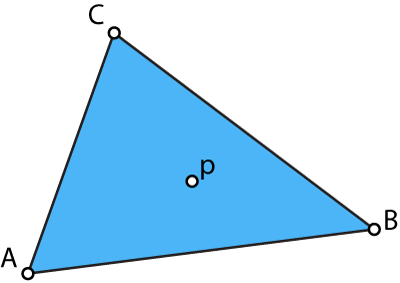
How to test if a point is inside of a triangle?
收藏到CSDN网摘
 To determine if a point P is inside or outside a given triangle defined by 3 vertices P1, P2, and P3. The edges can be calculated first as 3 vectors:
P12 = P1-P2; P23 = P2-P3; P31 = P3-P1. Then, its a simple task.
To determine if a point P is inside or outside a given triangle defined by 3 vertices P1, P2, and P3. The edges can be calculated first as 3 vectors:
P12 = P1-P2; P23 = P2-P3; P31 = P3-P1. Then, its a simple task.
12 Jan 2021
Instant Update Plots in Jupyter Notebook
收藏到CSDN网摘
 Jupyter Notebook is a very effective toolkit for both teaching and learning. The interactive mode is straightforward for demonstrating the logic behind the code blocks and explaining how the programme works segment by segment. With the help of powerful Matlab-equivalent matplotlib library, data plotting can be easilly implemented. However, from time to time, you might miss Matlab's `hold on` capability that enables the user draw on and update the plot instantly without producing multiple figures that flood your screen. In Jupyter notebook, if the plt.show() was called without a loop it will produce multiple outputs as many as your loop count, which is not convenient. To make it works in the same way as Matlab's `hold on`, all we need to do is:
Subscribe to:
Posts
(
Atom
)